
For a first trip to China, set up one payment app before you leave, then add the other if you want a second option. Alipay is a sensible place to start if you’re setting up an app just for this trip; if you already use WeChat, start with its wallet. Both accept eligible overseas cards. Bring a physical bank card and some renminbi cash as backup.
The aim is to have a card listed in your app, any requested identity checks completed and access to your bank’s security messages. Adding a card prepares the account; your first shop payment still needs to be approved.
Before you start
Have your phone number, passport and a bank card in your own name ready. Download the app from your phone’s official app store. Ask your card issuer whether overseas and online purchases are enabled, and make sure you can receive its security codes while travelling.
You can register with an overseas phone number. A Chinese SIM is not a prerequisite for these setup steps. Keep access to the number you register with, even if you buy a separate data plan in China.
Set up Alipay
- Open Alipay, enter your mobile number with the correct country code and complete registration using the verification message.
- Open Me → Bank Cards → Add bank cards. A new account may show Add Now instead. Enter the card details requested by the app.
- Complete your bank’s approval step. If Alipay asks for identity verification, enter your passport details and complete the checks inside the app.
- Return to Bank Cards and confirm that the card appears. Open the payment-code screen to see which card is selected before using it at a checkout.
Ready to try: you can sign in, the card is listed and there is no outstanding verification request. Once you’re in China, use a small purchase at a business to check that a payment goes through. A transfer to a friend is a different feature and won’t test shop payments.
The menu path follows Shanghai’s September 2026 payment guide; the card-addition labels also appear in Beijing’s step-by-step guide. Labels can differ slightly between app versions.
Set up WeChat Pay
WeChat’s mainland payment service is also called Weixin Pay in official guidance.
- Download or update WeChat, then register or sign in with your mobile number. Complete any account checks shown during registration.
- Go to Me → Services → Wallet → Bank Cards and choose the option to add a card.
- Enter your card details, accept the payment-service terms and complete any bank approval or identity check requested in the app. If passport verification is requested, submit it through the official app.
- Go back to the card list and check that your card is there. Before paying, open the payment-code screen and check the selected payment method.
Ready to try: your card is listed, requested checks are complete and you can access the payment screen. As with Alipay, confirm the first real shop payment in the app’s transaction history.
This path uses the same September 2026 official guide. If the wallet is missing or the menu looks different, use that guide’s illustrated instructions before changing account settings.
Can you use a foreign card for every payment?
A shop purchase and a transfer to someone’s personal account are different. The People’s Bank of China’s Shenzhen guidance says overseas cards linked to Alipay cannot fund person-to-person transfers or red packets, which are digital cash gifts.
If a seller asks you to transfer money to a person and the app rejects it, ask for a business payment code or offer cash. Repeatedly adding the same card won’t turn a personal transfer into a shop payment. Acceptance also depends on your card and the merchant’s payment setup.
How to pay with a QR code
If you scan the seller’s code: open Scan, scan the business’s QR code and enter the amount if asked. Check the business name, amount and selected card, then confirm.
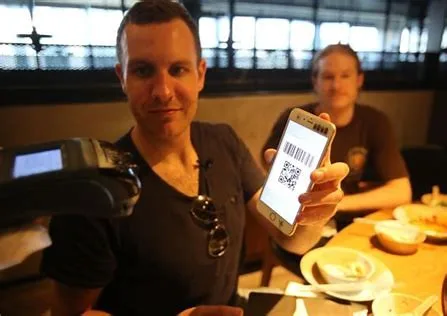
If the seller scans your phone: open your payment-code screen and show it to the cashier. Keep that code private from anyone who isn’t taking the payment.
Check the result in the app. If the seller is unsure whether the payment went through, look at your transaction history together before trying again. Keep the receipt or order details if you might need a refund.


Fees and exchange rates
Before confirming a payment, look at the purchase amount, any app service fee and the selected card. Your issuer may add a foreign-transaction or currency-conversion charge separately. Compare the final card statement with the app receipt if the amounts differ.
The government’s daily-life services guide says charging rules and limits vary by payment product. Use the fee shown for your transaction rather than assuming every purchase is free. For a large purchase, settle the amount and refund terms with the seller before authorising it.
Bring a bank card and some cash
Bank of China supports withdrawals with eligible overseas cards at its ATMs. Match your card network’s logo, have your PIN ready and read the charges shown before proceeding.
Carry smaller renminbi notes as well as your card. Keep part of your backup money separate from your phone. Confirm how your hotel will take payment and any deposit, so a hotel bill doesn’t become your first payment test.
What to do if something fails
| What you see | What to do next |
|---|---|
| No registration or security code | Check the country code and the number receiving the message. Keep that SIM active; a data-only eSIM doesn’t receive messages sent to a different number. |
| An identity-check request | Complete the requested check in the official app. Don’t email passport images to a seller or to LanternGlow. |
| Card won’t link, or the bank declines it | Read any bank alert and ask the issuer about overseas online purchases and its approval step. If the bank sees no problem, contact the app’s support with the error text. |
| A personal transfer is rejected | Ask for a business checkout payment or use cash. A linked overseas card doesn’t provide every wallet feature. |
| The result is unclear | Check transaction history with the seller before paying again. Save the order details. |
For unresolved account or payment errors, use the app’s official help. The PBOC Shenzhen guide also lists the Weixin Pay support number +86 571 95017. For a bank decline, contact the number on your card or in your banking app. Don’t share passwords or security codes.
Finish by sorting out mobile data and verification messages. Your payment app needs a working connection when you arrive.

Sources and updates
Sources checked on 29 Oct 2026.
- People’s Bank of China payment guide, published by the Ministry of Culture and Tourism
- Bank of China: financial services for short-term international visitors
- Shenzhen Nanshan: payment services for overseas visitors
- Shanghai municipal government: Alipay and Weixin Pay setup, September 2026
- Beijing municipal government: illustrated payment setup and help
- State Council: daily-life services, payment verification and charging rules
Check the latest official information for your travel date before making a booking.
Spotted a mistake? Let me know.